 Plugindex
Narrow it however you think
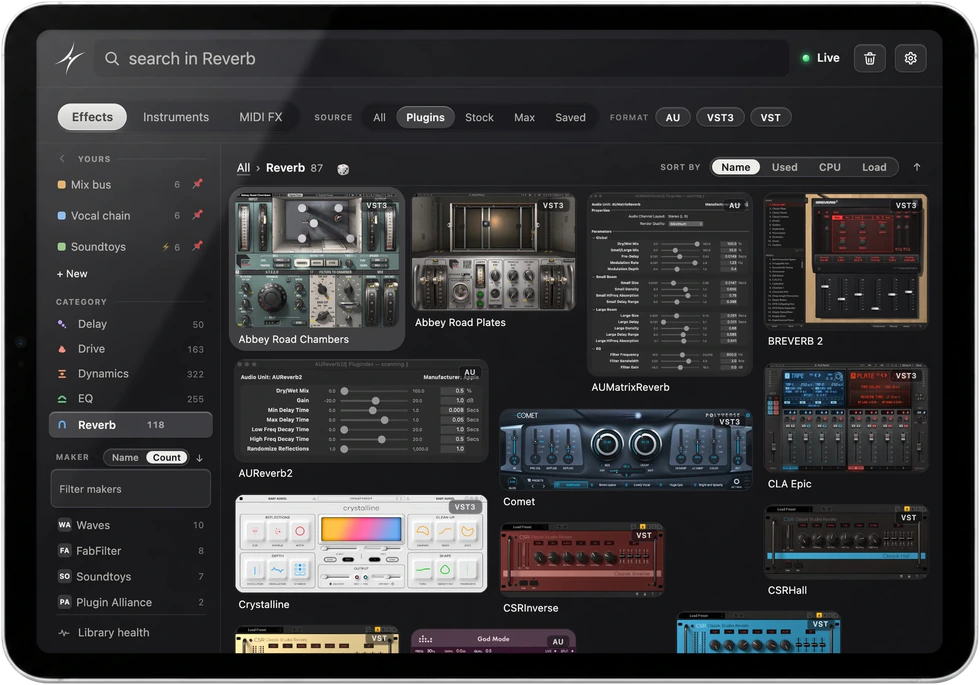
Type a few letters of a maker and the grid comes down to theirs. Or filter by category, format or source. You never had to file any of it.
14 days of Pro, then Free. No account, no card. Works with nine DAWs
Detected automatically.
Ableton Live, Logic Pro, Pro Tools, FL Studio, Cubase, Nuendo, Bitwig, REAPER and Studio Pro. The library filters to the one you're in.
AU, VST, VST3, AAX
Plus stock devices, Max for Live, racks and your saved presets.
Runs outside your DAW
Not a plugin. Nothing in your signal path, nothing on your CPU meter.
$99, one computer
Mac or Windows. Paid once and yours to keep. Includes a year of updates. No account required to use it.
Type a few letters of a maker and the grid comes down to theirs. Or filter by category, format or source. You never had to file any of it.
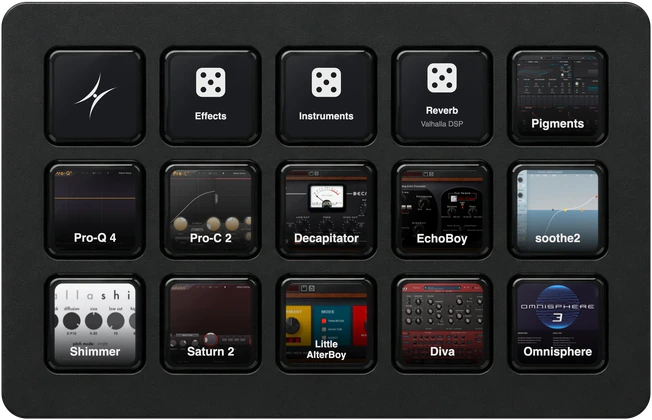
Drag a card onto the keyboard, or press the key you want. Plugindex tells you whether that binding works in every DAW you use or only the one you're in.
Launch a scene, tap the tempo or open the mixer from any key. 77 controls in Ableton Live, 51 in Logic Pro and 39 in Pro Tools today, with more DAWs coming soon.


Click it, or hit its key. Plugindex drives the host the way you would, so the device lands on the track you had selected, in the next free slot, without you touching a menu.
Once a month, Plugindex checks your plugin folders: what won't load, the duplicate copies you can clear out, and how much space you'd get back. It also keeps track of which plugins your Ableton Live sets use, and which ones they're missing.

Press a key or tap an iPad, and the plugin lands on the selected track.
Part of Pro. Any browser on the same Wi-Fi, paired once with a code.
Free
Try it on your own library, as long as you like.
$0 no card
Pro
Everything Plugindex can do, with no limits.
$99$149 once
Need five or more? Studio and classroom pricing.
Student or teacher? Email support@plugindex.app for 50% off.
It's easy to forget what plugins you already have, so Plugindex gives you the ability to sort through what you have by picture instead of name.
Click the plugin or add it as a hot key. All it takes is one click or hot key press to load your plugin. Plugindex drives your DAW the way you would, and the plugin lands on the selected track in the next free slot.
It is the browser your DAW should have had. You can actually see every plugin you own, categorized automatically. This takes the busy work out of categorizing and organizing your entire plugin library while also giving you the option to customize your organization. Plugindex speeds up your workflow by shortening the distance between you and the plugins that you use to make music. Its design encourages creativity and nudges you toward plugins you forgot you had.
Yes. It scans your computer and adds only what you have, so every plugin your DAW can load shows up in Plugindex.
It includes 14 days of Pro. After that your library and your mappings stay the same. Every plugin in your index is still searchable. Loading plugins through Plugindex becomes limited to 50 a week, resetting every Monday. Key mappings become limited to three mapped keys total. Upgrade to Pro, $99 once, for unlimited loads and key mapping, the remote on any device, Stream Deck keys, SoundFlow commands, the Sidecar and Mini shapes, loading through AudioSuite, checking a Live set before you open it, and a year of updates.
Yes, for a year. You pay once, and if you never pay again, the version you have keeps working. Every update released in your first year is included. After that, a newer version is an upgrade at half price, and it's optional: you only upgrade when a new version has something you want. Free is always the newest version, because it's how people try Plugindex, but every version of Free keeps the same limits: 50 loads a week and three keys.
On the Mac: Ableton Live 11 and 12, Logic Pro, Pro Tools, FL Studio, Cubase and Nuendo 15 or later, Bitwig Studio, REAPER and Fender Studio Pro 8.
On Windows: Ableton Live, Cubase and Nuendo 15 or later, FL Studio, Bitwig Studio, REAPER and Fender Studio Pro 8, with Pro Tools still in progress.
The chart below has it host by host. Plugindex detects the DAW that is running and shows only what it can load.
Logic Pro 10 has not been tested, so we can't promise it. Plugindex is tested on Logic Pro 12 and macOS 26 Tahoe, and customers use it on Logic Pro 11. Free costs nothing, so try it in your own Logic before you buy.
The app runs on macOS 13 Ventura or later, Apple silicon and Intel. macOS 27 Golden Gate hasn't been tested yet.
No. It runs beside your DAW, not in your session. It is not a plugin, so it is never in your signal path. Summon it, load, and it is gone.
To activate a license, then a quick check about once a day while it is online. The app runs offline in between, and a dropped connection never locks you out. If it cannot check in for sixty days, loading falls back to the Free allowance until it can. A license activated before version 1.4 needs one online check by the end of 2026 to carry on.
Yes. Windows 10 or 11, 64-bit. Pro Tools on Windows is still in progress. See the compatibility chart for every DAW.
Open Setup & connection in the Plugindex menu: it shows one step at a time, and restarting your DAW once fixes most of the rest. The help page has setup and fixes for every DAW. Still stuck? Choose Send feedback… in the same menu and we'll take it from there.
| Host | Mac | Windows |
|---|---|---|
| Ableton Live 11 and 12 | Yes | Yes |
| Logic Pro 11 and 12 | Yes | Mac only |
| Pro Tools | Yes | In progress |
| FL Studio | Yes | Yes |
| Cubase 15 or later | Yes | Yes |
| Nuendo 15 or later | Yes | Yes |
| Bitwig Studio | Yes | Yes |
| REAPER | Yes | Yes |
| Fender Studio Pro 8 | Yes | Yes |
One license covers either.
Live, Cubase, Nuendo, FL and Bitwig take a small Plugindex script, installed for you. Bitwig needs one click in its Controllers settings; FL needs Plugindex switched on in its MIDI settings, which the app checks for you, plus the free loopMIDI on Windows. Studio Pro takes a small Plugindex device, also installed for you, which you add once in its External Devices settings; on Windows it needs loopMIDI too. REAPER needs nothing installed. On the Mac, Logic and Pro Tools need Accessibility permission; Windows asks for none.
Once per DAW, and the app walks you through it. Help for every DAW.